
How to Secure Your Exchange Account (2FA & Passkeys)
Lock down your crypto exchange account: passkeys, authenticator apps, anti-phishing codes, and withdrawal whitelisting, in the right order.
 Lucas Almeida 5 min read
Key takeaways
- The strongest login protection is a passkey or hardware security key, followed by an authenticator app. SMS codes are the weakest because a phone number can be hijacked through a SIM-swap attack.
- An anti-phishing code lets you spot a fake email instantly, and withdrawal address whitelisting stops the one move a thief is actually trying to make: moving your money out.
- Secure your email with its own 2FA first — your inbox is the recovery path to most exchange accounts, so it is the back door.
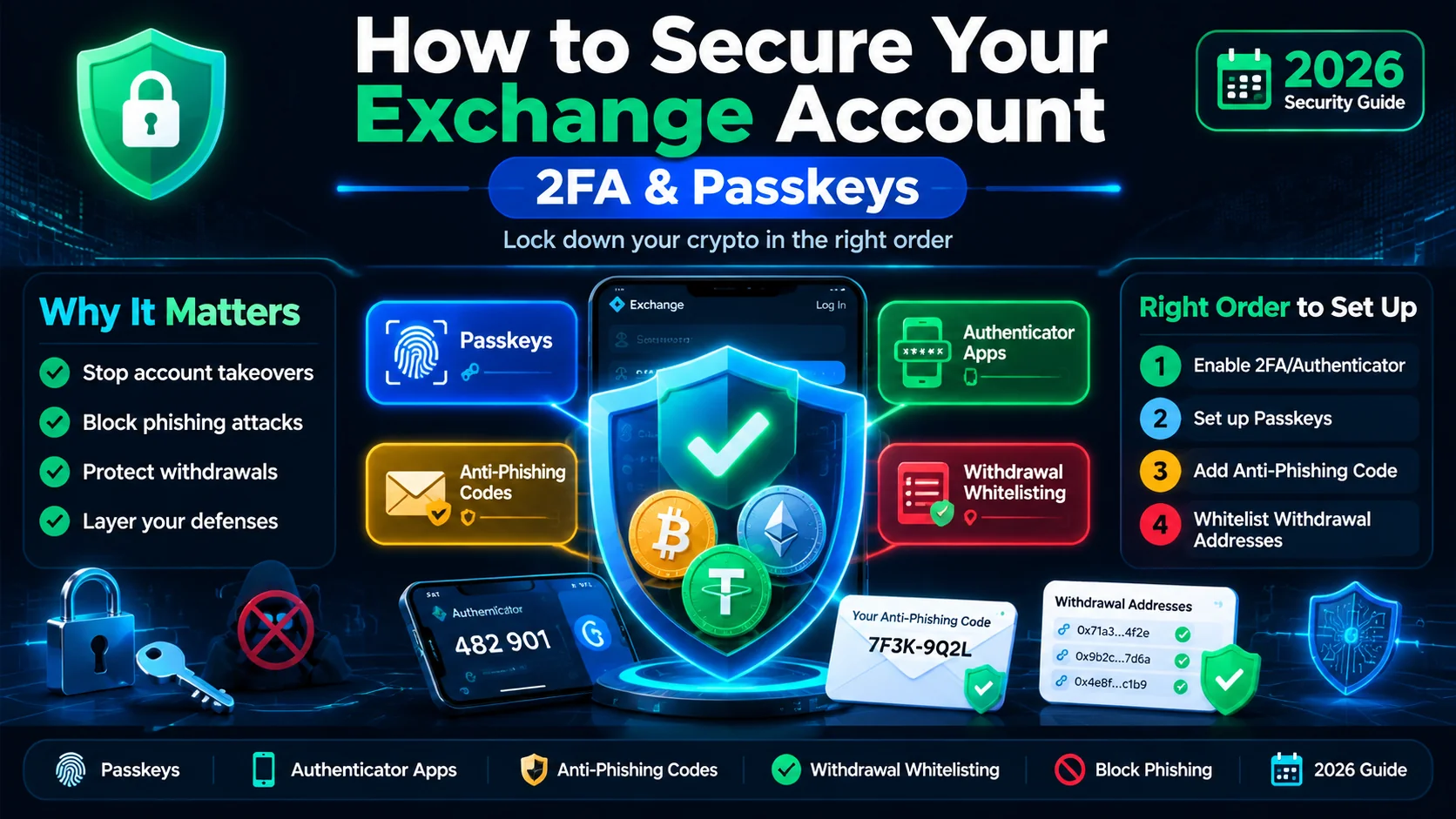
- Do the hardening in order: password → email → login 2FA → anti-phishing code → withdrawal whitelist → device and session review. It takes under 30 minutes, once.
The fastest way to make your exchange account hard to steal is to turn on a passkey or an authenticator-app code, set an anti-phishing code, and whitelist your withdrawal addresses — in that order. It takes under 30 minutes once. Skip it, and a single reused password or one convincing fake login page can empty the account.
This guide walks through the defenses in the order they matter, which ones each major exchange offers, and what to do in the first hour if you think someone is already inside.
Why a strong password isn’t enough anymore
A long, unique password is necessary but nowhere near sufficient. Passwords leak in bulk from breaches you never hear about, and people reuse them across sites — so the password you use on an exchange may already be sitting on an attacker’s list.
Two-factor authentication (2FA) is what makes a leaked password useless. Microsoft reported that multi-factor authentication blocks 99.9% of automated account-compromise attacks. For a crypto exchange, where the balance is money and transactions are irreversible, that second factor is the difference between a frustrating notification and a drained account.
The mental model to keep: the password proves something you know; the second factor proves something you have or are. An attacker who steals one usually cannot get the other. For a deeper look at what 2FA actually is, read our 2FA glossary entry.
Which 2FA method should you choose?
Not all 2FA is equal. Ranked from strongest to weakest, and why the order matters:
| Method | How it works | Strength |
|---|---|---|
| Passkey / hardware security key | A cryptographic credential on your device or a USB key (YubiKey and similar), unlocked with biometrics or a PIN | Strongest — phishing-resistant |
| Authenticator app | A 6–8 digit code that changes every 30 seconds, generated on your phone | Strong — but a code can be phished if you type it into a fake site |
| SMS code | A code texted to your phone number | Weakest — a phone number can be hijacked |
The gap between the top and bottom is the gap between “attack the crypto” and “attack your phone company.” A SIM-swap is when an attacker convinces your mobile carrier to activate your number on a SIM they control — usually using personal details harvested from data leaks. Your phone goes dead, and every SMS code meant for you lands on their device instead. This is why exchanges now recommend passkeys specifically because they are immune to SIM-swapping, as Binance’s passkey guidance explains.
The rule of thumb: use a passkey or security key for an account holding serious money, an authenticator app as the practical everyday floor, and SMS only as a last resort.
What is a passkey, and why is it the strongest option?
A passkey is a modern replacement for both the password and the 2FA code. It is a cryptographic key pair stored on your device — your phone, computer, or a hardware security key — and unlocked with your fingerprint, face, or device PIN.
Three properties make it stronger than a code:
- Nothing to type, nothing to phish. There is no 6-digit code for a scammer to ask you to “read back.” A fake site cannot collect a passkey because the passkey never leaves your device.
- Bound to the real site. Passkeys are cryptographically tied to the exact website domain, so they simply refuse to work on a lookalike like
binnance.com. This defeats phishing at the protocol level, not the awareness level. - Immune to SIM-swaps. Because nothing depends on your phone number or the carrier, taking over your number gets an attacker nothing.
The catch is practical: if you lose the only device holding your passkey, you are locked out. So enroll two passkeys — for example one on your phone and one on a hardware key kept at home — exactly as Kraken recommends for its sign-in 2FA.
How to harden your exchange account, step by step
Here is the full sequence, in the order that matters. Do the earlier steps even if you do nothing else — they carry most of the protection.
Step 1: Set a strong, unique password
Create a password of at least 15 characters, never used on any other site, and store it in a password manager. A password manager generates and remembers it for you, so “I can’t memorize it” is no longer a reason to reuse one.
Step 2: Secure your email account
Your inbox is the recovery back door: most exchanges reset passwords and confirm withdrawals through email. Enable the strongest 2FA your email provider offers — a passkey or hardware key if possible — and give the email account its own unique password. A strong exchange login protecting a weak inbox is a locked front door with an open window.
Step 3: Enable a passkey or authenticator app
In the exchange’s security settings, add a passkey if it is offered, or an authenticator app otherwise. Scan the QR code with the app, then save the backup codes you are shown — on paper, offline, treated with the same care as a seed phrase. These are the spare keys if your phone dies.
Step 4: Set an anti-phishing code
If the exchange offers one (Binance and Bybit do), set a short phrase of your choosing. The exchange stamps that phrase into every genuine email it sends you. A message that claims to be from the exchange but is missing your code is a fake, full stop — see the next section.
Step 5: Turn on withdrawal address whitelisting
Enable the allowlist so crypto can only be sent to addresses you have explicitly saved, then add your own wallet addresses to it. This is the single highest-value setting, because a thief who breaches your login still cannot move money anywhere except to an address you already control. See why below.
Step 6: Configure per-action 2FA and withdrawal locks
Where the exchange supports it, require 2FA for withdrawals and settings changes separately from login, and enable any withdrawal delay or lock. On Binance this is the “2FA Verification Strategy” (detailed here); on Coinbase it is Transfer Protection.
Step 7: Review devices, sessions, and API keys
Finally, open the account’s security or device-management page and look at the list of logged-in sessions and active API keys. Revoke anything you do not recognize. An attacker who is already inside will usually have an active session or an API key that you did not create — this is how you find them.
What is an anti-phishing code, and how does it stop fake emails?
An anti-phishing code is a short phrase you choose that the exchange inserts into every legitimate email it sends. Binance’s is eight characters; you set it once in your security settings, and from then on any real Binance email contains it.
The value is speed: instead of squinting at a sender address or a link, you glance at one line. Your code present = real. Your code missing or wrong = fake. Since phishing is how most exchange-account takeovers actually begin — a convincing email that drives you to a lookalike login page — this single line defeats the most common opening move. See our phishing field guide for the full pattern library, and our crypto scams guide for how these attacks play out end to end.
Why withdrawal whitelisting is the move that actually saves you
Most people think of account security as “keep the hacker out.” But a motivated attacker only needs to be right once, and you need to be right every time. Withdrawal whitelisting changes that math.
When you whitelist, crypto can leave your account only to addresses you have pre-approved. Even if an attacker logs in — password, 2FA, everything — the money cannot go to their wallet; it can only go to yours. The attack has no payout, which is the strongest possible deterrent.
Two details to get right:
- Add your own addresses before you need them. Most exchanges hold new whitelisted addresses in a cooling-off period (Coinbase holds a new address for 48 hours, for example). Set this up now, not mid-withdrawal.
- Keep the whitelist tight. If you stop using an address, remove it. An unused address left in the list is a destination you are no longer watching.
Which exchanges support which defenses?
Features vary, and they change — always confirm in the exchange’s current security settings. This is the picture as of October 2026:
| Defense | Binance | Coinbase | Kraken | |---|---|---|---|---| | Passkey / security key | ✅ | ✅ | ✅ | | Authenticator-app 2FA | ✅ | ✅ | ✅ | ✅ | | Anti-phishing code | ✅ (8-char) | — | — | | Withdrawal whitelist | ✅ | ✅ (allowlist) | ✅ | | Per-action 2FA / withdrawal lock | ✅ (“2FA Verification Strategy”) | ✅ (Transfer Protection) | ✅ (Global Settings Lock) |
A ”—” means the specific feature is not documented in the sources reviewed here — not that the exchange is unsafe. The three universal settings — passkey, authenticator app, and withdrawal whitelist — exist on all three, so a beginner who enables those three is protected on any of them.
What should you do in the first hour if you think you’re hacked?
If you see a login from a device you do not recognize, an email you did not trigger, or a withdrawal you did not make, act in this order:
- Freeze withdrawals if the exchange offers a freeze or account-lock control — this buys you time.
- Change your password, then reset your 2FA (re-scan the QR code) so any session an attacker set up is orphaned.
- Revoke all API keys and logged-in devices from the security page. This is where an attacker’s persistent access hides.
- Contact the exchange’s official support through its real website or app — never through a number or link from a message, which may itself be the scammer.
- Report the theft to the platform and your local authorities, and preserve transaction hashes, screenshots, and messages as evidence.
Be realistic about the money: crypto sent out is almost never recovered, because transactions are irreversible by design. The goal of the first hour is to stop further loss and lock the attacker out. For the self-custody side of the same question, see how to keep your wallet safe.
The bottom line
Securing an exchange account is a short, ordered checklist, not a mystery: a unique password, 2FA on your email, a passkey or authenticator app for login, an anti-phishing code, withdrawal whitelisting, and a review of your devices and API keys. Do it in that order and the account becomes a hard target instead of a soft one.
If you are setting up a new account, run this checklist right after creating your Binance account, before you deposit anything. And remember the boundary: 2FA protects accounts, while your own private keys and seed phrase protect self-custody — the two need different disciplines.
Don't have a Binance account yet?Sign up nowenter the referral codeBN2688
Frequently asked questions
Which is better — an authenticator app or SMS 2FA?
What is a passkey, and how is it different from regular 2FA?
What should I do if I lose my phone or authenticator app?
Do I really need 2FA on my email account too?
What should I do first if I think my account is compromised?
Is SMS 2FA better than nothing?
Editor-in-Chief & Lead Researcher
Editor of MyCryptoStart. Independent researcher of cryptocurrency exchanges, focused on fees, security, KYC, and onboarding — publishes step-by-step guides in plain English for beginners.
View author page →Some links on this page are affiliate links: we may earn a commission at no extra cost to you. This content is educational and is not financial, investment, or legal advice. Affiliate disclosure · Disclaimer.
Continue reading
Common Crypto Scams and How to Avoid Them
The most common crypto scams — pig butchering, phishing, rug pulls, and giveaway fraud — how each works, the red flags, and what to do if scammed.
What Is a Private Key? (And Why It's Secret)
A private key is the secret code that proves you own your crypto and lets you spend it. Learn how it works and how to keep it safe.
What Is a Seed Phrase? How to Protect It
A seed phrase is a 12–24 word master key that controls your wallet. Learn what it is, how to store it safely, and how to spot the scams that steal it.